
Indiana Farm Bureau
IN Farm BureauEvents
3.134.00 Reviews
- Version
- 3.10
- Installs
- 10.00K
- Age Rating
- Everyone
Screenshots
Our Review of Indiana Farm Bureau
 Analysis by Appyee
I approached Indiana Farm Bureau as an event-focused companion rather than a general-purpose news or social app. It is the official app associated with Indiana Farm Bureau, developed by IN Farm Bureau, and its clearest value is staying connected with that organization through a phone instead of relying entirely on a browser, printed material, or scattered messages. That narrow purpose is important: this is not an app I would install for entertainment, broad local discovery, or a full calendar of every event in Indiana.
My overall impression is practical but cautious. The app is free, rated for Everyone, and has reached over ten thousand installs, so it is accessible to a broad audience. At the same time, its average rating of 3.1 suggests that the experience has not been universally smooth for users. I would consider it most useful for people who already have a reason to follow Indiana Farm Bureau activities and want a direct mobile route to related event information.
How the app feels during ordinary use
The first thing I would expect from an app like this is quick access to relevant event material. An organization-specific app should not make me dig through unrelated content before I can find what matters. In that respect, the focused identity is a strength: I know why I am opening it, and I am not treating it like a crowded event marketplace where every result competes for attention.
Speed expectations should remain modest. The app is an older product, released on November 15, 2017, and its current version is 3.10. That does not automatically make it slow, but it does make me less likely to expect the polished transitions, instant refresh behavior, or elaborate personalization found in newer event platforms. For a simple check of organization-related information, that may be perfectly acceptable. For rapid switching between several event pages while traveling, the experience may feel less modern.
What matters most here is not flashy motion but whether the app gets me to the information I need without unnecessary effort. I would judge it by a simple routine: open it, locate the relevant event or update, confirm the details, and close it. That workflow suits a focused organizational tool better than prolonged browsing. If I had to repeatedly reload screens or search through several layers, the benefit over a mobile website would become much smaller.
A useful habit is to open the app before leaving for an event rather than waiting until I am already in a parking lot or standing in a busy venue. That gives the app time to load its content and gives me a chance to notice anything that needs attention. It is a small distinction, but it separates a dependable planning tool from something I am forced to test under pressure.
Where it fits in an event-planning routine
I see the app working best as one part of a larger routine. I might use it to check Indiana Farm Bureau information, then put the confirmed time and location into my phone calendar. That second step is worthwhile because an organization app and a personal calendar solve different problems. The app is the place I consult for the organization’s material; the calendar is the place I rely on for reminders and schedule conflicts.
This also creates a helpful recovery path. If the app takes longer than expected to open at the last minute, I am not starting from zero if I have already saved the essential appointment details elsewhere. I would not treat that as a criticism unique to this app; it is simply sensible planning for any event tool that may depend on current content or a working connection.
For families, the same approach can reduce friction. One person can check the organization’s event information, while another keeps the household schedule. For volunteers or members who attend recurring activities, checking the app at a regular time each week may be more efficient than opening it repeatedly throughout the day. That is a specific advantage of a focused app: it can become a predictable checkpoint instead of another source of constant notifications and distractions.
What happens during heavier use
The app’s heavier-use moments are likely to come from behavior rather than demanding graphics. I would think of heavy use as opening it repeatedly around an event, moving between sections, refreshing information, or checking it while other apps are active. This is where an older app can reveal its age more clearly than during a single casual launch.
I would avoid assuming that a short delay means the phone is struggling. Event information may need to load, and the result can depend on the device, connection, or the amount of content being requested. The more useful test is whether the app recovers after a pause. If I can wait briefly, return to the previous screen, and continue without losing my place, the delay is inconvenient but manageable. If I have to restart the entire process, the same delay becomes much more disruptive.
My practical advice is to avoid repeatedly tapping a button when a screen appears quiet. Rapid repeated taps can create confusion in almost any mobile app, especially when a page is still responding. I would tap once, give it a moment, and then try a back-and-forward recovery if needed. That sounds basic, but it is a realistic way to prevent a minor loading pause from turning into a messy session.
I also would not keep it open all day simply because an event is approaching. A focused event app does not need to become a permanent background task. Opening it when needed, reviewing the information, and closing it afterward is a cleaner routine for battery-conscious users. The app is free, but that does not mean every user should give it unlimited space in their daily phone habits.
Stability, interruptions, and recovering from a problem
The average rating of 3.1 from around seventy-five ratings gives me a balanced reason to be careful. It is not evidence that the app fails for everyone, but it does suggest that the experience may vary from one user or device to another. I would install it with reasonable expectations and test the basic workflow before depending on it as my only source of event information.
Reliability is especially important for an organization app because people often open it with a specific purpose. A delayed entertainment app is annoying; a delayed event app can affect travel, arrival time, or participation. I would therefore check important details earlier in the day and keep the key information available through a second method, such as a calendar entry or a note. That is the most useful way to handle uncertainty without abandoning the app altogether.
If the app stops responding, my recovery sequence would be straightforward. I would return to the home screen, reopen it, and try the same task once more. If that does not help, I would restart the phone before assuming the problem is permanent. I would also check whether the issue affects only one page or the entire app. A single troublesome screen calls for patience and an alternative route; a complete failure means I should use another source for the immediate event and revisit the app later.
That recovery mindset matters because this is not an app I would recommend using blindly at the exact moment an event begins. Its role is better suited to preparation and confirmation. I like tools that remain useful when something goes wrong, and here the safest strategy is to avoid putting all the responsibility on one app session.
Older phones and everyday device limits
The minimum operating-system requirement is Android 7.0, which makes the app available to people using older Android devices rather than restricting it to recent hardware. That is a meaningful accessibility point. Someone who keeps a dependable older phone may be able to use this app without upgrading solely for event access.
Compatibility, however, is not the same as a modern experience. A phone that meets the minimum requirement may have less memory, a slower processor, or limited free storage compared with a newer model. I would expect the app to be more comfortable on a device with enough free space and a stable connection, particularly when I am switching between it and other apps while planning a trip or checking a schedule.
There is also a difference between the app’s own demands and the demands of its surroundings. If I am in a crowded venue, weak connectivity may affect loading even when the phone itself is working normally. If the battery is low, repeatedly reopening any event app is poor planning. I would check the information before leaving and avoid treating the venue as the first place to discover whether the app works well on my particular device.
For users who prefer very lightweight tools, a browser or a saved calendar entry may feel simpler. For users who want an organization-specific place to check information, the dedicated app is more convenient when it behaves as expected. The choice depends less on raw phone power than on whether the app’s focused access is worth keeping alongside the alternatives already on the device.
How it compares with common alternatives
The usual alternative is a mobile website. A browser is often better when I need to search broadly, share a page, or avoid installing another app. It can also be easier for someone who checks Indiana Farm Bureau information only occasionally. The dedicated app becomes more appealing when I return to the same organization frequently and want a direct icon rather than a browser tab or a remembered address.
A general event-calendar app offers the opposite trade-off. It can bring many organizations and appointments together, which is useful for comparing schedules. However, that breadth can make organization-specific information harder to find. Indiana Farm Bureau’s app is more specialized, so I would choose it when my interest is already centered on that organization rather than on discovering unrelated events.
Email and social channels are another practical comparison. They may be better for conversations, forwarding information, or seeing updates mixed with other messages. The app offers a more deliberate check-in point, but it may not replace those channels for every kind of communication. I would use the app for structured event access and keep messaging tools for coordination with other people.
A paper handout or a saved screenshot can still win in one situation: when I am already on the way and do not want to depend on loading anything. The app’s strength is current, organized access before the event; the offline backup’s strength is immediate availability after I have saved the details. Using both is more sensible than forcing one tool to do every job.
Who should install it, and who should skip it
I would recommend trying it to Indiana Farm Bureau members, participants, volunteers, and families who regularly need event-related information from the organization. The free price removes the financial barrier, and the Everyone age rating makes it suitable for a broad household audience. It is also a reasonable option for someone who prefers a dedicated app over repeatedly navigating a browser.
I would be less enthusiastic for a person who wants a complete statewide event directory, rich social interaction, or a universal calendar that combines many organizations. This app’s identity is too specific for those expectations. Someone who checks Indiana Farm Bureau information only once may also prefer the browser, especially if phone storage or app clutter is a concern.
People using older Android phones should pay attention to the operating-system requirement before planning around it. Those on Android 7.0 or later have a compatible starting point, but the actual experience can still differ with hardware and connectivity. I would install it, perform one complete test search or event check, and decide from that real workflow rather than assuming compatibility guarantees smoothness.
My performance verdict after weighing convenience and risk
Indiana Farm Bureau makes sense as a focused event app for people who already have a clear connection to Indiana Farm Bureau. Its strongest quality is purpose: it gives that audience a dedicated place to check relevant information instead of blending it into a broad, noisy event service. The free cost and support for older Android versions make trying it easy.
My reservation is that the app’s age and mixed rating make it difficult to recommend as the sole last-minute source for an important event. I would use it for preparation, confirmation, and routine checks, then save essential details somewhere I can reach quickly. That workflow protects me from delays without throwing away the app’s convenience.
In everyday terms, I would install it if Indiana Farm Bureau events are part of my regular schedule. I would skip it if I am looking for a general event-discovery tool or if I already have a browser routine that works just as well. The best reason to keep it is repeated, organization-specific use—not novelty. With that expectation, it can be a useful companion; with broader demands, another option will probably serve me better.
For me, the final decision is a qualified recommendation. I like the direct purpose, the accessible price, and the possibility of using it on an older Android device. I would simply pair it with a personal calendar and a basic backup habit. That combination turns a potentially inconsistent last-minute tool into a more dependable part of an event-planning routine.
Verdict
Strengths of Indiana Farm Bureau
- Provides insurance options tailored to Indiana residents and farm owners.
- Local agents can offer personalized guidance and support.
- Useful for managing policies, claims, and account details digitally.
- Farm-focused expertise may suit agricultural businesses and rural households.
- Established regional organization with community-focused services.
Limitations of Indiana Farm Bureau
- Availability and features may be limited outside Indiana.
- Some services may require contacting an agent rather than using the app.
- Insurance quotes and coverage depend on individual eligibility.
- The interface may feel less polished than larger national insurers’ apps.
- Farm-specific tools may not be useful for customers seeking basic coverage only.
Similar Picks in This Category
View All
Easy Quran Mp3 Audio Offline
Muslim Worldapp4.7

Invitation Maker: Cards & RSVP
Greetings Island4.9

StubHub - Live Event Tickets
StubHub4.3

Fever: Events & Tickets
Fever Labs4.7

Epic Freebie Games Radar
Arioch Pds - Apps & Games4.4

Invitation card Maker, Design
Splendid App Maker4.9
Frequently Asked Questions
What is the Indiana Farm Bureau app used for?
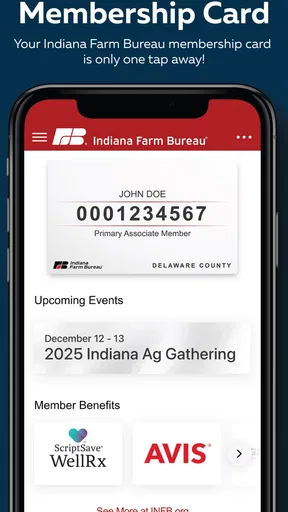
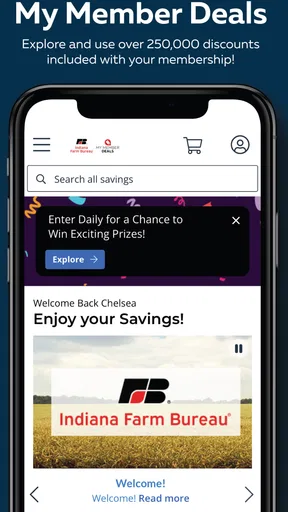
The Indiana Farm Bureau app is designed to give members convenient access to organization-related information and services from a mobile device. Depending on your membership and location, you may be able to view benefits, read news and updates, find contact information, access events or resources, and stay connected with Indiana Farm Bureau programs without relying entirely on the website.
Do I need to be an Indiana Farm Bureau member to use the app?
Some features may be available to anyone who downloads the app, such as general news, public information, or organization updates. However, member-specific tools and benefits may require an active Indiana Farm Bureau membership and account credentials. If you are not a member, the app may still help you learn about the organization, but access to personalized content can be limited.
How do I sign in or access my member information?
After installing Indiana Farm Bureau, look for the sign-in or member-access option and use the credentials associated with your Indiana Farm Bureau account. If your details are not accepted, verify that your membership is active and that you are using the correct email address or username. Password recovery or account assistance may be available through the organization’s official support channels.
Can I use Indiana Farm Bureau to find local offices, agents, or events?
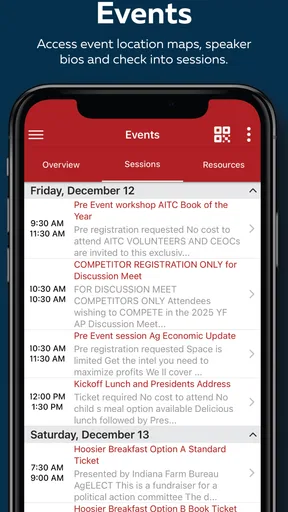
The app may provide tools for locating Indiana Farm Bureau offices, agents, services, or upcoming events, although the exact options can vary by app version and account status. Location-based results may require permission to access your device location. You can usually search manually if you prefer not to grant location access, but results may be less convenient.
Is the Indiana Farm Bureau app free and what permissions does it require?
The Indiana Farm Bureau app is generally available to download without an upfront charge, although membership fees, insurance products, or other services promoted through it may involve separate costs. During installation or first use, it may request permissions such as notifications, location, or storage. Review each permission carefully and allow only the access needed for the features you plan to use.
